
Use Personalizations to add customized content to messages
You can add Contact-specific content to your messages to include the recipients Address, Birthdate, Email, First Name, Full Name, and more!
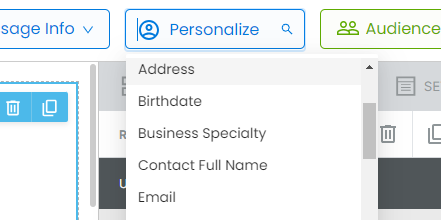
Click on Personalize at the top of your Draft, then scroll down to the field you want. Click on that field, and it will put the Personalization into your clipboard. Then Paste that into your message. It will display in brackets:
Hi, {{First_Name}}!
And will auto-fill with that Contact's information upon sending, so they see:
Hi, John!
On the message they receive. Each receiving Contact will see their own relevant information.
You can use Personalizations in the message, the Subject Line, and the Preheader.